I created a workflow project on the Dify platform (Dify API version 1.11.1) and had the large model output a Mermaid code block, then passed it to an output node. However, the output node could not render it into a chart normally. It’s really baffling! But when I tested it, I created other branches and had the large model output the Mermaid code block I gave it, and some of them rendered successfully. I feel like the Dify platform’s support for Mermaid might be limited! Below is an output from my LLM (including ‘think’). Could anyone help analyze the reason?
{
"text": "\u003cthink\u003e\\nOkay, the user wants me to output the Mermaid chart code exactly as provided. The content is about the trend of Ningbo's permanent population.\\n\\nThis task seems very straightforward: just copy the content I received completely. The user specifically emphasized 'output as is,' indicating they might be very concerned about the accuracy of the format and details, and don't want any changes.\\n\\nLet me look at this code. It's an xychart-beta chart, with the title, axis labels, and data all clearly defined. This type of chart is usually used in documents or web pages to display data trends.\\n\\nI just need to ensure the output content is exactly the same, including details like code block markers, indentation, and punctuation. The user might want to verify if this code can render correctly, or needs to insert it somewhere.\\n\\nSince the user's request is so clear, I will not add any explanations or extra processing; I will reply directly with the original content.\\n\u003c/think\u003e```mermaid\\nxychart-beta\\n title \\\"宁波常住人口数量变化趋势(2021-2024)\\\"\\n x-axis \\\"年份\\\" [2021, 2022, 2023, 2024]\\n y-axis \\\"常住人口数量 (万)\\\" 950 --\u003e 990\\n line [954.4, 961.8, 969.7, 977.7]\\n```",
"reasoning_content": "",
"usage": {
"completion_price": "0.000738",
"completion_price_unit": "0.000001",
"completion_tokens": 246,
"completion_unit_price": "3",
"currency": "RMB",
"latency": 9.117,
"prompt_price": "0.000206",
"prompt_price_unit": "0.000001",
"prompt_tokens": 103,
"prompt_unit_price": "2",
"time_to_first_token": 0.831,
"time_to_generate": 8.285,
"total_price": "0.000944",
"total_tokens": 349
},
"finish_reason": "stop"
}
Here are my workflow screenshots and LLM prompts:
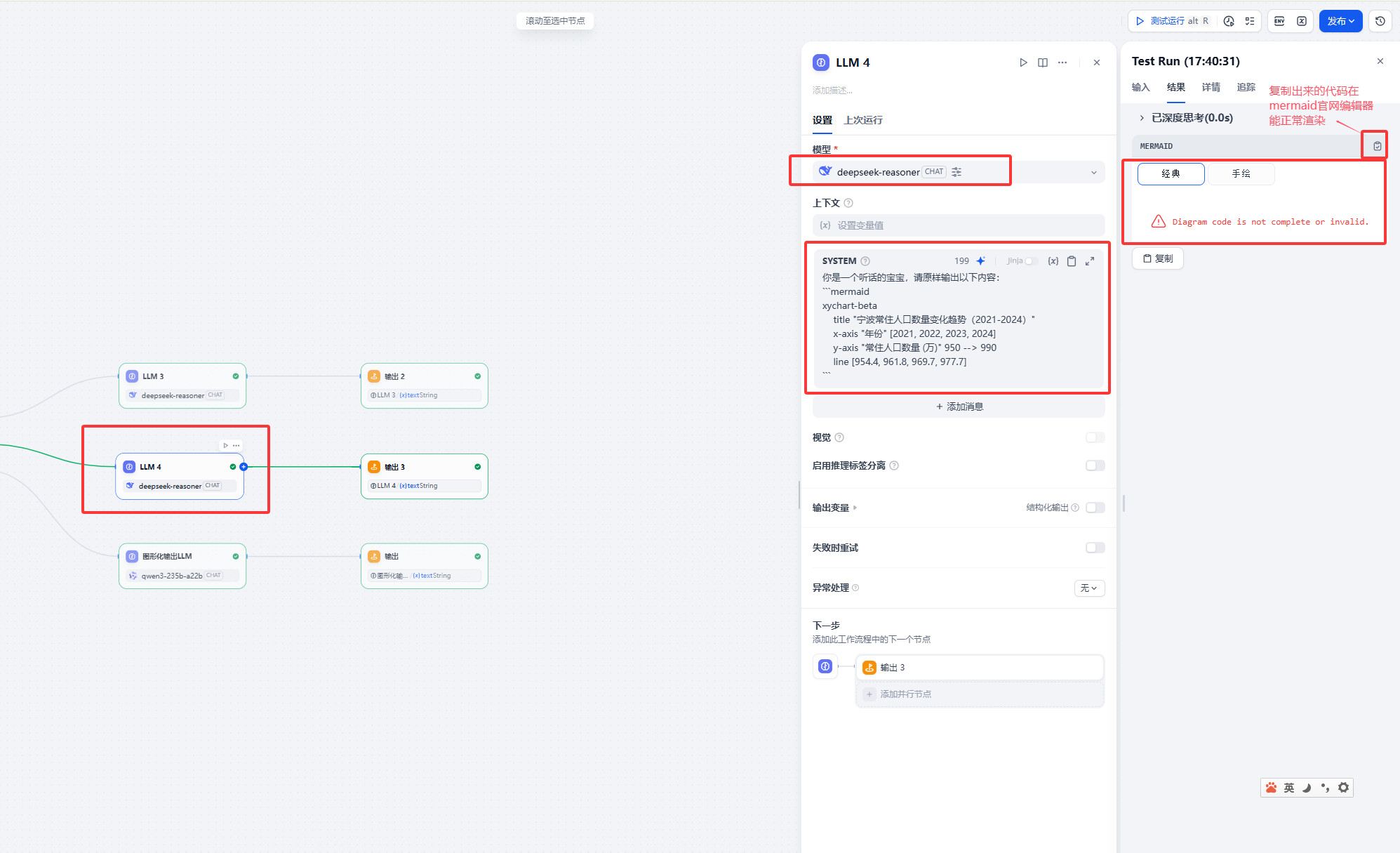
The following is the prompt content, for patient friends to test:
You are an obedient baby, please output the following content as is:

```mermaid

xychart-beta

    title "Ningbo Resident Population Change Trend (2021-2024)"

    x-axis "Year" [2021, 2022, 2023, 2024]

    y-axis "Resident Population (10k)" 950 --\u003e 990

    line [954.4, 961.8, 969.7, 977.7]

```